AI-Powered Frontend Testing: A Practical Guide for Developers
Frontend testing has always had a gap between what teams intend to test and what actually gets written. AI tools are starting to close that gap — but only if you use them in ways that produce meaningful coverage, not just passing tests.
This guide covers the full frontend testing stack: unit tests, integration tests, E2E flows, and visual regression — with concrete examples of where AI accelerates each layer, which tools fit where, and what to watch out for.
The Frontend Testing Pyramid (and Where AI Fits)
The classic testing pyramid still applies:
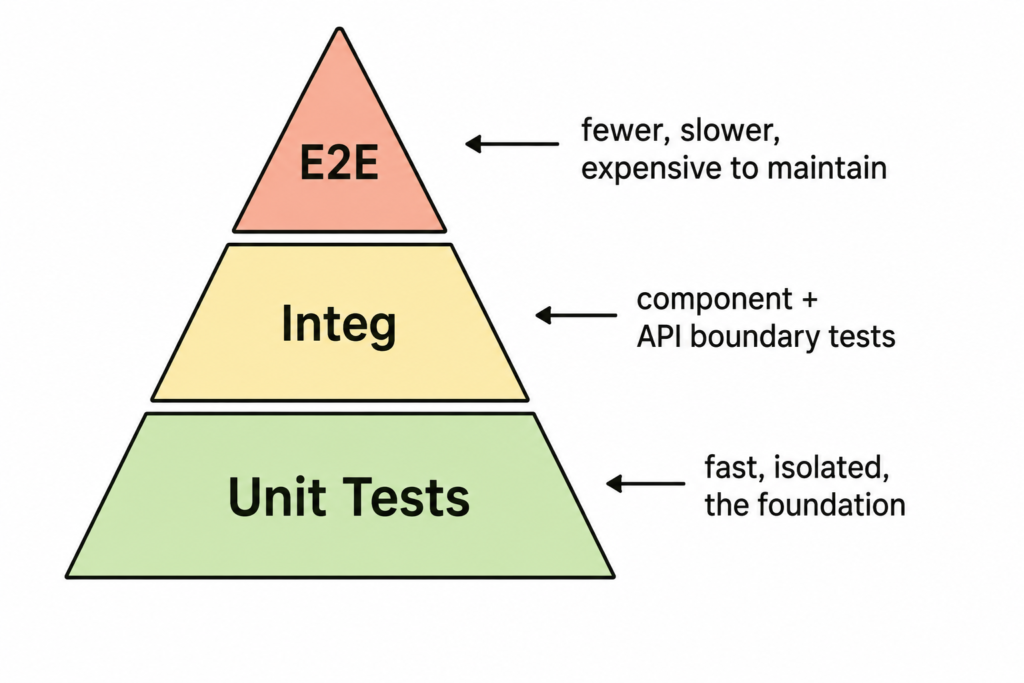
AI tools are most effective at the unit and integration layers — where the scope is bounded and the patterns are repetitive. E2E tests require more human judgment about what flows actually matter to the business.
1. Unit Tests: Where AI Saves the Most Time
Unit tests in frontend are mostly about testing pure logic: utility functions, state reducers, hooks, formatters.
This is AI’s strongest category. The patterns are mechanical, the scope is small, and a good AI tool will cover edge cases you’d likely skip when writing manually.
Example: Testing a utility function
typescript
// utils/currency.ts
export function formatCurrency(amount: number, locale = 'en-US', currency = 'USD'): string {
  return new Intl.NumberFormat(locale, {
    style: 'currency',
    currency,
  }).format(amount);
}
Prompt to Claude or Copilot:
Write Vitest unit tests for this formatCurrency function.
Cover: positive numbers, zero, negative numbers, large numbers,
different locales (pt-PT, en-GB), and invalid inputs.
Use describe/it blocks. No mocking needed.
Output you should expect:
typescript
import { describe, it, expect } from 'vitest';
import { formatCurrency } from './currency';

describe('formatCurrency', () => {
  it('formats a standard USD amount', () => {
    expect(formatCurrency(1000)).toBe('$1,000.00');
  });

  it('formats zero correctly', () => {
    expect(formatCurrency(0)).toBe('$0.00');
  });

  it('formats negative amounts', () => {
    expect(formatCurrency(-250)).toBe('-$250.00');
  });

  it('formats large numbers with correct separators', () => {
    expect(formatCurrency(1_000_000)).toBe('$1,000,000.00');
  });

  it('formats in pt-PT locale with EUR', () => {
    expect(formatCurrency(1000, 'pt-PT', 'EUR')).toMatch(/1\.000,00/);
  });
});
What to review before committing:
- Are the expected values correct for your locale? Locale output can vary between Node versions.
- Did AI skip any domain-specific edge cases? (e.g., your app might never receive negative values — or always does)
- Is the test structure consistent with the rest of your test suite?
Tools for this layer:
- Vitest — fast, native ESM, Vite-native. Recommended for new projects.
- Jest — the standard for most existing React/Vue codebases.
- Testing Library — for component-level unit tests.
2. Component Tests with Testing Library
Component tests are where AI generates the most boilerplate — but also where the most common mistakes happen. Models tend to test implementation details instead of behavior.
The rule to enforce in every prompt
“Test what the user sees and does, not how the component is implemented.”
This aligns with Testing Library’s guiding principle: query by accessibility role, label, and visible text — not by class names, IDs, or internal state.
Example: A form component
tsx
// components/LoginForm.tsx
export function LoginForm({ onSubmit }: { onSubmit: (email: string) => void }) {
  const [email, setEmail] = useState('');
  return (
    <form onSubmit={(e) => { e.preventDefault(); onSubmit(email); }}>
      <label htmlFor="email">Email</label>
      <input
        id="email"
        type="email"
        value={email}
        onChange={(e) => setEmail(e.target.value)}
      />
      <button type="submit">Sign In</button>
    </form>
  );
}
Prompt:
Write React Testing Library tests for this LoginForm component.
Use userEvent for interactions. Test:
1. Renders email field and submit button
2. Calls onSubmit with the entered email when submitted
3. Does not call onSubmit if email field is empty

Use getByRole and getByLabelText — avoid getByTestId and class selectors.
What good output looks like:
typescript
import { render, screen } from '@testing-library/react';
import userEvent from '@testing-library/user-event';
import { LoginForm } from './LoginForm';

describe('LoginForm', () => {
  it('renders email field and submit button', () => {
    render(<LoginForm onSubmit={vi.fn()} />);
    expect(screen.getByLabelText(/email/i)).toBeInTheDocument();
    expect(screen.getByRole('button', { name: /sign in/i })).toBeInTheDocument();
  });

  it('calls onSubmit with email when form is submitted', async () => {
    const user = userEvent.setup();
    const onSubmit = vi.fn();
    render(<LoginForm onSubmit={onSubmit} />);

    await user.type(screen.getByLabelText(/email/i), 'jorge@example.com');
    await user.click(screen.getByRole('button', { name: /sign in/i }));

    expect(onSubmit).toHaveBeenCalledWith('jorge@example.com');
  });
});
Watch for: AI often uses fireEvent instead of userEvent. Always push back — userEvent simulates real browser behavior (focus, keyboard events, blur) while fireEvent is a synthetic shortcut. This matters especially for validation logic tied to focus/blur.
References:
- Testing Library: Common Mistakes — Kent C. Dodds
- userEvent vs fireEvent
3. Hook Testing
Custom hooks are pure logic with a React lifecycle attached — ideal for AI-assisted tests.
typescript
// hooks/useDebounce.ts
export function useDebounce<T>(value: T, delay: number): T {
  const [debouncedValue, setDebouncedValue] = useState(value);
  useEffect(() => {
    const timer = setTimeout(() => setDebouncedValue(value), delay);
    return () => clearTimeout(timer);
  }, [value, delay]);
  return debouncedValue;
}
Prompt:
Write Vitest tests for this useDebounce hook using renderHook from @testing-library/react.
Use vi.useFakeTimers(). Test:
1. Returns initial value immediately
2. Does not update before delay has passed
3. Updates after delay
4. Cancels previous timer when value changes before delay
The key instruction here is vi.useFakeTimers() — without specifying fake timers, AI will either omit timer control entirely or use setTimeout workarounds that make tests flaky.
References:
4. E2E Tests with Playwright
Playwright is where AI assistance shifts from generation to acceleration. You still need to design the flows yourself — AI helps you write the code for them faster.
Generating tests from user stories
This is the most reliable AI prompt pattern for E2E:
User story: As a user, I can log in with valid credentials and be redirected to the dashboard.

Write a Playwright test in TypeScript for this flow.
Base URL: http://localhost:3000
Login page: /login
Dashboard URL after login: /dashboard
Selectors to use: getByRole and getByLabel. Avoid CSS selectors.
Include: successful login, failed login with wrong password (expects error message).
Using Playwright’s built-in AI codegen
Playwright’s codegen command records your interactions and generates test code:
bash
npx playwright codegen http://localhost:3000The output is functional but raw — it uses CSS selectors and attribute selectors that are brittle. Use AI to clean it up:
Here's a Playwright test generated by codegen. Refactor it to:
1. Replace all CSS selectors with getByRole, getByLabel, or getByText where possible
2. Add explicit waits using waitForURL or waitForResponse instead of hardcoded timeouts
3. Extract the login flow into a beforeEach block
4. Add assertions for both the happy path and the error state

[paste generated code here]
Page Object Model with AI
For larger test suites, the Page Object Model keeps things maintainable. AI is good at generating the initial structure:
Create a Playwright Page Object class for a checkout flow with these pages:
- CartPage: /cart — has item list, quantity inputs, "Proceed to Checkout" button
- CheckoutPage: /checkout — has address form, payment section, "Place Order" button
- ConfirmationPage: /confirmation — shows order number

Include typed methods for the most common interactions on each page.
Use TypeScript.
References:
- Playwright best practices
- Playwright codegen
- Page Object Model in Playwright
- Playwright vs Cypress comparison — official, but worth reading
5. Visual Regression Testing
Visual regression testing catches unintended UI changes — a refactor that shifts a layout, a CSS variable change that breaks dark mode, a third-party update that changes a component.
Playwright visual snapshots
Playwright has built-in screenshot comparison:
typescript
test('homepage matches snapshot', async ({ page }) => {
  await page.goto('/');
  await expect(page).toHaveScreenshot('homepage.png', {
    maxDiffPixels: 100,  // allow minor rendering differences
  });
});
On first run, it creates the baseline. On subsequent runs, it diffs against it. CI fails if the diff exceeds the threshold.
Prompt pattern for generating visual test suites:
Write Playwright visual regression tests for these components:
- Navigation bar (desktop and mobile viewport)
- Hero section
- Pricing cards (hover state included)
- Footer

Use page.setViewportSize for responsive tests.
Group by component in separate describe blocks.
Storybook + Chromatic
For component-level visual testing, Chromatic (by the Storybook team) is the production standard. It runs visual diffs against every Storybook story on every PR.
AI is useful here for generating the Storybook stories that Chromatic then tests:
Write Storybook 7 stories for this Button component.
Cover: Primary, Secondary, Disabled, Loading state, Small and Large sizes.
Use the CSF3 format with a meta object and named exports.
Include args for all variants.
References:
6. AI Tools Comparison for Frontend Testing
| Tool | Best for | Strengths | Watch out for |
|---|---|---|---|
| GitHub Copilot | Inline, in-editor generation | Low friction, context-aware | Tends to mirror test style of surrounding code, good or bad |
| Claude (API/claude.ai) | Generating full test files, refactoring suites | Follows explicit instructions well, handles complex prompts | Needs specific prompts to avoid implementation-detail testing |
| Cursor | Interactive test writing with codebase context | Understands file relationships, multi-file edits | Sends high token counts — not cost-efficient for large codebases |
| Copilot Chat | Quick explanations, fixing failing tests | Good at explaining why a test fails | Less reliable for generating from-scratch suites |
7. Practical Prompt Templates
Copy and adapt these for your workflow:
Generate unit tests for a function:
Write [Vitest/Jest] unit tests for the following [TypeScript/JavaScript] function.
Cover: happy path, edge cases, and error conditions.
Use describe/it blocks. [No mocking needed / Mock: list what needs mocking].
Function:
[paste function]
Generate component tests:
Write React Testing Library tests for this component.
Use userEvent (not fireEvent) for interactions.
Query by role and label only — no CSS selectors or data-testid.
Test: [list behaviors].
Component:
[paste component]
Refactor brittle tests:
Refactor these tests to remove implementation detail testing.
Replace [querySelector/className checks] with semantic queries.
Keep the same coverage but make tests resilient to internal refactors.
[paste tests]
Generate E2E from a user story:
Write a Playwright test in TypeScript for this user story:
[paste user story]
Use getByRole/getByLabel. Include success and failure cases.
Base URL: [url]
8. What AI Won’t Do Well (Yet)
Knowing what to test. AI generates tests for what you describe. It doesn’t know which flows are business-critical, which edge cases have caused production bugs, or which interactions are fragile. That judgment still lives with your team.
Maintaining tests after refactors. AI can help update tests after a refactor, but it needs the new component code and the old tests together. It won’t proactively flag that a test is now testing the wrong thing.
Complex async flows. Multi-step async interactions with race conditions, retries, or WebSocket events tend to produce fragile AI-generated tests that work locally and fail in CI. Write these manually.
Visual design intent. Visual regression tests tell you something changed. They can’t tell you if the change is intentional. That review is still human.
The Workflow That Actually Works
- Start with a failing test. Describe the behavior you want, let AI generate a draft, run it, and iterate on failures together. This is faster than generating a “complete” test file from scratch.
- Review before committing. AI-generated tests can pass while testing the wrong thing. Read every assertion and ask: “does this test actually break if the feature breaks?”
- Use AI to increase coverage, not replace thinking. AI is excellent at covering the 80% of repetitive, pattern-matching tests. Use that time to focus on the 20% that require judgment.
- Keep prompts in your repo. Document the prompt patterns that work for your codebase in a
TESTING.mdor similar. This compounds over time.
Frontend testing is one of the areas where AI tools deliver the most concrete time savings — not because the AI is making test strategy decisions, but because it’s eliminating the mechanical work of translating “what I want to test” into “working test code.” That’s a real gap, and closing it makes it easier to write the tests that actually matter.
What part of your frontend test suite takes the most time to write? Drop it in the comments.